

Switching from an iPhone to Android in 2026 is nothing like it was five years ago. The friction points that once made it feel like learning a new language moving your contacts, finding your apps, figuring out where everything went have mostly been ironed out. Data transfer tools have matured, Google’s ecosystem has caught up in depth and polish, and the Android phones themselves have crossed a threshold where they do not just match the iPhone 17 series in most areas but quietly beat it in several.
Still, “switching to Android” is not a single decision. It is a series of them. The Android market offers everything from a lean, software-forward experience on a compact device to a productivity powerhouse with a built-in stylus and a screen the size of a small tablet. Choosing wrong means spending $1,000 or more on something that does not actually fit how you live.
This guide cuts through the noise. It focuses on what iPhone users specifically need to hear: which Android phones feel least jarring on day one, which ones offer features you cannot get on iOS, and which one deserves to be your first pick.
Why 2026 Is Actually a Good Year to Make the Jump
A few things converged this year that make switching more compelling than it has ever been.
First, AI is no longer a marketing footnote. Google has integrated Gemini into Android at an operating system level, not just as a standalone app. Features like Circle to Search which lets you draw a circle around anything on your screen to search it instantly and real-time call transcription are baked in. Samsung layers its own Galaxy AI on top of that, adding proactive daily briefings and on-device translation. Siri is improving on iOS, but it is not at the same depth of integration yet.
Second, switching is genuinely easier. Samsung Smart Switch handles the migration of contacts, photos, messages, and even some app data from an iPhone. Google Drive can back up iPhone data that restores cleanly on a Pixel. The process still takes an afternoon, but it no longer requires a tech background.
Third, the hardware gap has closed. iPhone build quality was untouchable for years. Now Samsung’s Galaxy S26 Ultra ships with a titanium frame and Gorilla Glass Armor 2, and Google’s Pixel 10 series uses Gorilla Glass Victus 2 across the board. Both carry IP68 water resistance ratings that match or exceed current iPhones.
The Top Contenders
Google Pixel 10 Pro Review – The Closest Thing to iPhone Logic on Android
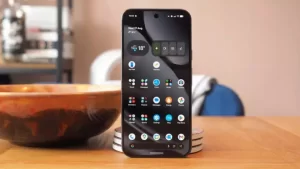
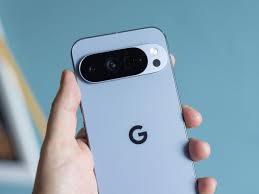
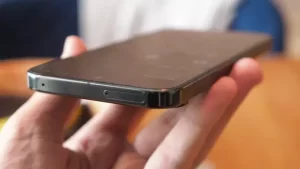
If your main concern is a smooth, intuitive transition, the Pixel 10 Pro is the phone to buy.
Google ships its Pixel line with what is essentially stock Android clean, uncluttered, and updated first. Where Samsung’s One UI adds layers of customization that can feel overwhelming to someone used to iOS’s focused approach, the Pixel interface is calm and purposeful. There is less to configure, less to accidentally break, and less visual noise on screen.
The Pixel 10 Pro comes with a 6.3-inch OLED display running at 120Hz with a peak brightness of 3,300 nits brighter than most of the competition. The Google Tensor G5 chip handles day-to-day performance competently, and 16GB of RAM means the phone does not slow down when you have ten tabs open and music playing in the background.
Camera quality is where Pixel phones have always led, and the 10 Pro holds that reputation. Google’s computational photography the software intelligence behind how each photo is processed remains best-in-class for still images. If you shoot a lot of photos of people in imperfect lighting, the Pixel handles it more naturally than almost anything else on the market.
The phone starts at $999 for the 128GB model. For most switchers, this is the recommendation.
Best for: Former iPhone users who want minimal learning curve, great photos, and timely security updates.
Samsung Galaxy S26 Ultra – The Power User’s Android
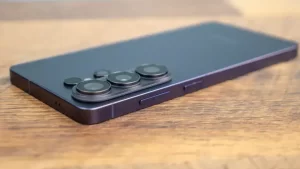
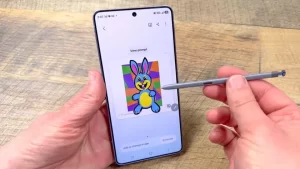
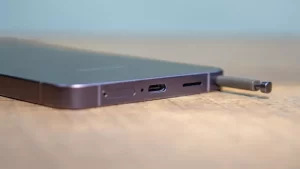
The Galaxy S26 Ultra is not subtle. It is a 6.9-inch behemoth with a built-in S Pen stylus, a quad-camera system, and a starting price of $1,300. It is the Android equivalent of going from an iPhone 17 Pro Max straight to a desktop workstation.
Samsung’s One UI software has matured considerably. It is no longer the cluttered, settings-heavy experience it had a reputation for being several years ago. The Galaxy AI features now powered by a Snapdragon 8 Elite Gen 5 chip built specifically for the S26 Ultra — include real-time translation, document summaries, and a “Now Brief” feature that surfaces relevant information from your calendar, messages, and habits throughout the day.
The display is a Dynamic AMOLED panel at 3120×1440 resolution with a 90.3% screen-to-body ratio. In direct sunlight, it is one of the clearest screens on any phone sold today. Battery life is strong at 5,000mAh, and fast charging brings it from empty to full significantly faster than Apple’s current charging speeds.
The S Pen is the wildcard. If you have ever found yourself wishing you could annotate a PDF, sketch a quick diagram, or take hand-written notes without carrying a separate device, it becomes indispensable within a week. It is a feature with no equivalent in the iPhone ecosystem.
Samsung’s Smart Switch tool makes the data migration from iPhone straightforward. You can read more about how it works on Samsung’s official support page.
Best for: Power users, note-takers, and anyone who wants Android’s most feature-complete device and is willing to spend for it.
Nothing Phone (3) – The Personality Pick
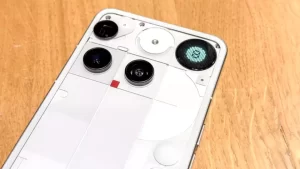
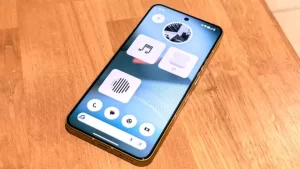
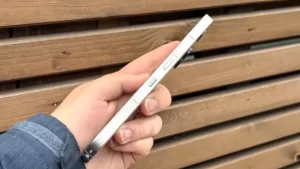
If neither pure function nor pure power fully captures what you want, the Nothing Phone (3) is worth a serious look. At $218g it runs heavier than a standard iPhone 17, but it brings something no other phone in this list offers: a genuinely distinctive visual identity.
Nothing’s Glyph Interface a system of LED strips on the back of the phone serves as a notification system, a charging indicator, and a design statement. It sounds like a gimmick until you actually use it. After a week, glancing at the back of your phone to see who called without picking it up starts to feel natural.
Nothing OS is clean and close to stock Android, which benefits switchers from iOS. The camera system is competitive at its price tier, and the phone brings genuine personality to a category that can feel same-y at the top end.
Best for: Design-conscious switchers who want something that stands out and does not cost flagship prices.
What You Will Miss, Honestly
No guide like this is complete without honesty about the trade-offs.
iMessage. This is the big one for most Americans. When you leave iPhone, your iMessage threads stay on Apple’s servers. Your contacts who use iMessage will see your texts come through as green bubbles, which means no read receipts, no high-quality media sharing through the native messaging app, and occasional delivery hiccups. Google Messages with RCS helps, and most of your contacts will barely notice in practice, but it is a real change worth acknowledging.
FaceTime. Android has no native equivalent. You will shift to WhatsApp, Google Meet, or Zoom for video calls, and if your family is heavily iPhone-based, you will need to get them to install something new.
AirDrop. Google has a feature called Nearby Share that works similarly, but it is not as seamless when the person you are sharing with is on iPhone.
App purchases. Any apps you paid for on iOS do not transfer to Android. Most major apps are free or subscription-based now, so this hurts less than it once did, but it is worth auditing your paid iOS apps before committing.
How to Make the Switch Without Losing Your Mind
A few practical steps that make day one much smoother:
Back everything up first. Use iCloud to create a full backup of your iPhone before you do anything else. Then, on your new Android device, download your carrier’s data migration app or use Samsung Smart Switch (for Samsung devices) to pull contacts, photos, and messages.
Give yourself two weeks. The hardest part of switching is unlearning muscle memory knowing where the back button is, how notifications work, how to quickly switch apps. Most people find their rhythm within ten days. Do not judge the phone by day three.
Set up Google services early. Gmail, Google Photos, Google Drive, and Google Calendar are the backbone of the Android experience. Getting them configured on your first day pays dividends for months. If you use Google Photos for backup, your camera roll will be accessible from any device you own.
Explore customization gradually. Android lets you change default apps, rearrange your home screen entirely, install widgets that surface live information, and customize your notification behavior in ways iOS does not allow. Do not try to learn all of it at once. Start with what you know, and add layers as you find them useful.
Summary:
For the majority of people switching from iPhone in 2026, the Google Pixel 10 Pro is the right choice. It is the Android phone that requires the least mental adjustment, delivers consistently excellent photos, receives updates fastest, and costs $999 a competitive price for what it offers.
If you are a heavy user who wants the most capable device available and the S Pen appeals to you, the Samsung Galaxy S26 Ultra is worth the premium. It is more phone than most people need, but for those who need it, there is nothing else quite like it.
Recommended: Best Phones for Content Creators in 2026 (Tested and Ranked)
Best Android Phone to Buy When Switching from iPhone in 2026: FAQ
Is switching from iPhone to Android worth it in 2026?
For most people, yes. Android flagships have quietly pulled ahead in battery life, charging speed, and AI tools that feel genuinely useful rather than bolted on. The real friction is ecosystem lock-in – iMessage group chats drop to SMS, AirDrop has no Android equivalent, and your Apple Watch becomes a paperweight. If those things run your life, expect a rough few weeks. If they don’t, the switch is easier than you’re probably expecting.
What happens to my iMessage conversations when I switch?
Before switching, deregister your phone number from iMessage through Apple’s support tool at appleid.apple.com. Skipping this step causes messages from other iPhones to route to iMessage rather than your Android, appearing delivered when they haven’t been received. After deregistration, those contacts will see your messages as regular SMS. Google Messages with RCS covers the functional gap for Android-to-Android communication, including read receipts and typing indicators, but the blue-bubble status is tied to iMessage and stays behind.
Will my AirPods work with an Android phone?
They’ll connect and play audio without any fuss. What you lose is everything Apple built on top of that – ear detection, Siri, battery readouts, seamless device switching. For casual listening they’re fine. If you want the full integration experience, Galaxy Buds or Pixel Buds are the honest recommendation.
Which of these phones is most similar to an iPhone in daily use?
The Google Pixel 10 Pro comes closest. Stock Android without manufacturer overlays, day-one updates matching iPhone’s rhythm, camera output that doesn’t require retuning your eye for color, and a 6.3-inch size that matches the iPhone 17 footprint – all of these make the Pixel the lowest-friction entry point. Nothing OS on the Nothing Phone (3) is the second-most minimal Android experience here, but Nothing’s update delivery lags behind Pixel’s by months.
Do any of these phones support MagSafe accessories?
The Google Pixel 10 Pro is the only phone in this group with a built-in magnetic array. Its Pixelsnap system is based on the Qi2 standard, which shares the same magnet specification as MagSafe, and most MagSafe-compatible cases, wallets, and charging pucks snap correctly onto the Pixel. The other four phones use standard Qi wireless charging without magnets universal magnetic cases are available as a third-party solution for all of them.
How long will they get updates?
Samsung S26 Ultra and Pixel 10 Pro both commit to seven years, same as iPhone. OnePlus and Nothing offer four years of OS updates, five of security patches. The Razr 60 Ultra gets three years – the weakest in the group by a distance. If you hold phones for four or five years, that gap matters more than most specs on the sheet.
What replaces Siri?
Gemini and Google Assistant handle voice queries noticeably better in day-to-day use. But the bigger shift is features that run without you asking Circle to Search lets you draw around anything on screen and look it up instantly, Call Screen transcribes unknown callers before you answer, Now Playing identifies music in the background automatically. None of it requires switching modes. That’s the real difference.
Does Google Pay replace Apple Pay?
Completely, for everyday use. Same contactless terminals, same in-app support. Your cards won’t transfer automatically – you’ll spend about 15 minutes re-adding them to Google Wallet and then the experience is essentially identical.